
SMS Opt-In & Consent
This page documents how customers consent to receive SMS messages from Lightspeed Labs and ReadyRing. We provide it for transparency, regulatory compliance, and carrier review verification. If you have questions about our SMS practices, contact us at support@lightspeedlocal.com.
How Customers Opt In
Customers opt in to SMS through one opt-in path, with affirmative consent collected and logged. We never send SMS without prior consent.
In-App Notification Settings (ReadyRing)
ReadyRing customers (businesses subscribed to our voice receptionist service) opt in to SMS notifications inside their ReadyRing account. After signing in, they navigate to Settings → Notifications, enter their phone number into a dedicated phone field, and check a consent checkbox before receiving any messages. The checkbox is unchecked by default. Below is a screenshot of the opt-in form.
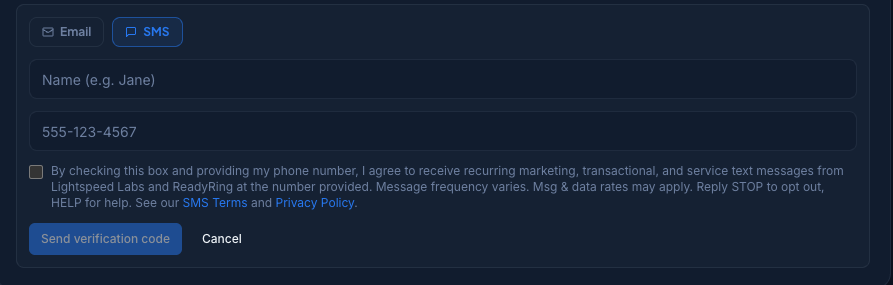
Disclosure language displayed at the form
By checking this box and providing my phone number, I agree to receive recurring marketing, transactional, and service text messages from Lightspeed Labs and ReadyRing at the number provided. Message frequency varies. Msg & data rates may apply. Reply STOP to opt out, HELP for help. See our SMS Terms and Privacy Policy.
How to Opt Out
Reply STOP to any message to immediately unsubscribe from all SMS messages. You can also email support@lightspeedlocal.com to be removed from our SMS lists. Reply HELP at any time for assistance.
Sample Messages
Sample 1 — 2FA / Verification Code
Lightspeed Labs: Your verification code is 123456. Do not share this code.
Sample 2 — Account Notification (ReadyRing)
ReadyRing: New call for Acme Plumbing From: John Smith Called from: (555) 123-4567 Summary: Caller asked about scheduling a drain cleaning appointment. Duration: 1m 42s
Sample 3 — Marketing (service upsell)
Lightspeed Labs: Free 15-min review of your website and customer-inquiry flow — see where AI and automation could help. Get details at lightspeedlocal.com. Reply STOP to opt out, HELP for help.
Sample 4 — Marketing (subscription offer)
Lightspeed Labs: Save 20% on ReadyRing when you switch to annual billing. Details at app.readyring.ai. Reply STOP to opt out, HELP for help.
Keyword Behavior (STOP / HELP / START)
- STOP — Immediately unsubscribes your number from all further messages. You will receive a confirmation reply.
- HELP — Returns a help message with support contact information. Does not change your subscription status.
- START — Re-enables messaging if you previously opted out. A re-subscription confirmation is sent.